
The gaming industry has rapidly evolved, and with that evolution comes the demand for high-performance laptops capable of handling the latest games while providing a seamless user experience. One such laptop that has gained significant acclaim in this domain is the Razer Blade 14. Known for its sleek design, powerful performance, and impressive display, the Razer Blade 14 has become a favorite among gamers and professionals alike. In this article, we will delve deep into the various aspects of the Razer Blade 14, exploring its specifications, performance, design, features, and much more.
Design and Build Quality
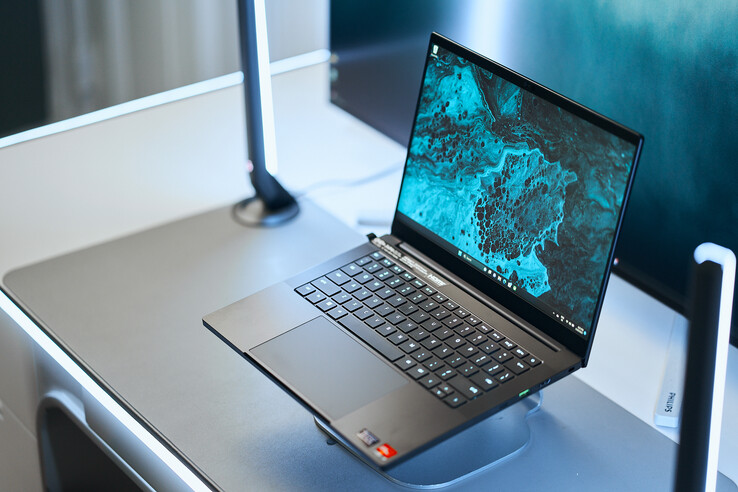
Sleek Aesthetic and Portability
The Razer Blade 14 stands out with its striking aesthetic appeal. Crafted from a single piece of aluminum, the device boasts a premium look that sets it apart from other gaming laptops on the market. The matte black finish enhances its sleekness, giving it a modern and sophisticated appearance. Weighing only 4.0 pounds and measuring just 0.66 inches thick, the Razer Blade 14 is incredibly portable, making it an ideal choice for gamers who are constantly on the move.
The laptop’s slim profile does not compromise its durability. Razer has engineered the Blade 14 to withstand everyday wear and tear, ensuring that it remains in pristine condition even after extensive use. This combination of style and resilience makes the Razer Blade 14 a standout option for anyone seeking a gaming laptop that blends aesthetics with functionality.
Keyboard and Trackpad
The keyboard on the Razer Blade 14 is another notable feature. Equipped with customizable RGB backlighting, the keys provide excellent tactile feedback, allowing for comfortable typing and gaming experiences. Gamers can choose from a wide range of lighting effects through Razer Synapse software, adding a personal touch to their setup.
Additionally, the precision glass trackpad offers smooth navigation and supports Windows Precision drivers, allowing for accurate tracking and gestures. Whether you’re browsing the web or navigating complex game menus, the trackpad provides an intuitive experience that complements the laptop’s overall user-friendliness.
Display Quality
One of the most impressive aspects of the Razer Blade 14 is its display. Featuring a 14-inch QHD (2560 x 1440) resolution panel, the screen delivers stunning visuals with vibrant colors and sharp details. The high refresh rate of up to 165Hz further enhances the gaming experience by reducing motion blur and providing smoother gameplay.
For content creators, the Blade 14’s display covers 100% of the sRGB color gamut, making it an excellent choice for photo editing and video production as well. The thin bezels surrounding the display maximize screen real estate, creating an immersive experience whether you’re gaming or working on creative projects.
Performance and Specifications
Hardware Configuration
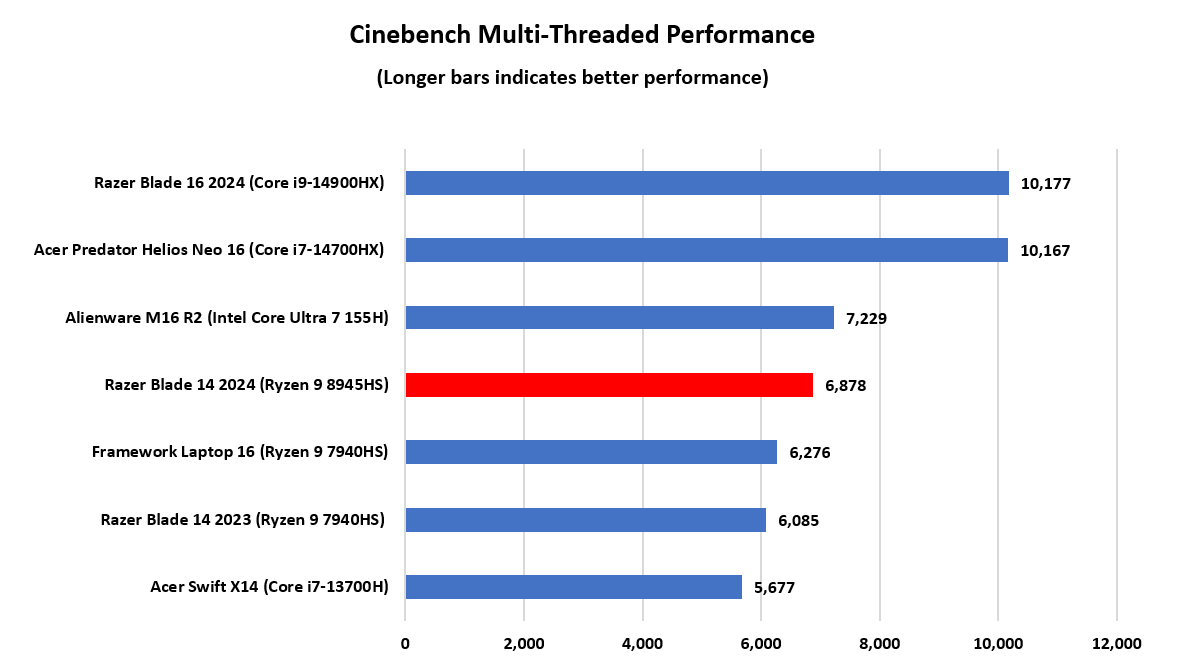
Under the hood, the Razer Blade 14 is equipped with top-of-the-line hardware that delivers exceptional performance. With options for AMD Ryzen 9 5900HX or Intel’s 11th Gen Core i7 processor, users can expect lightning-fast speeds and efficient multitasking capabilities. Coupled with NVIDIA GeForce RTX 30 series graphics cards, including the RTX 3060 and RTX 3070, the Blade 14 effortlessly handles the demands of modern gaming.
In terms of RAM, the Razer Blade 14 offers configurations up to 32GB, ensuring smooth operation even when running resource-intensive applications. For storage, users can take advantage of NVMe SSD options that provide fast load times and ample space for games and files. Overall, the hardware configuration of the Razer Blade 14 positions it as a formidable contender in the gaming laptop market.
Gaming Performance
When it comes to gaming performance, the Razer Blade 14 truly shines. With its powerful GPU and high refresh rate display, players can enjoy smooth frame rates and stunning graphics in popular titles like Call of Duty, Cyberpunk 2077, and Fortnite. The laptop’s cooling system is designed to manage heat effectively, preventing thermal throttling during long gaming sessions.
Benchmark tests have shown that the Razer Blade 14 can handle demanding games at high settings without compromising performance. This makes it an ideal choice for competitive gamers looking to gain an edge over their opponents. Furthermore, support for NVIDIA DLSS (Deep Learning Super Sampling) technology allows players to achieve higher frame rates while maintaining visual quality, making the Razer Blade 14 a great investment for avid gamers.
Productivity and Multitasking
Not only is the Razer Blade 14 a powerhouse for gaming, but it also excels in productivity tasks. Its strong processing capabilities make it suitable for video editing, graphic design, and 3D rendering. The laptop’s lightweight form factor and long battery life add to its versatility, allowing users to work efficiently on the go.
With multiple ports available, including USB-C, Thunderbolt 4, HDMI, and a headphone jack, users can easily connect peripherals and accessories for enhanced productivity. The Razer Blade 14 is a device that caters to both gamers and professionals, making it a versatile option for those seeking a high-performance laptop.
Battery Life and Charging

Longevity and Efficiency
Battery life is often a concern for gamers, especially when using powerful laptops. The Razer Blade 14 addresses this issue with impressive battery longevity. Depending on usage, the laptop can last anywhere from 6 to 10 hours on a single charge. This makes it suitable for mobile gamers who need a reliable device that can keep up with their lifestyle.
Razer has implemented power-efficient components in the Blade 14, allowing it to balance performance and battery efficiency effectively. Users can adjust power settings based on their needs, whether they’re gaming, streaming, or working on creative projects.
Charging Capability
Charging the Razer Blade 14 is a straightforward process, thanks to its included 230W power adapter. The laptop supports rapid charging, allowing users to regain a significant amount of battery in a relatively short period. This feature ensures that you won’t be left waiting for long before getting back to your gaming or work sessions.
For those who require a more compact solution, the Razer Blade 14 is also compatible with USB-C charging. This means that you can use a portable charger for convenience during travel, although the charging speed may vary compared to the standard adapter.
Real-World Usage Scenarios
In real-world scenarios, the battery performance of the Razer Blade 14 holds up well under various conditions. For instance, casual gaming sessions may yield longer battery life, while intensive gaming or running demanding applications will naturally drain the battery faster. However, the ability to switch between High Performance and Balanced modes enables users to find the right balance between power consumption and performance.
Whether you’re commuting, attending classes, or simply enjoying a gaming session on the couch, the Razer Blade 14’s versatile battery life and charging options make it a practical choice for today’s mobile users.
Connectivity and Ports
Comprehensive Port Selection
The Razer Blade 14 is equipped with a comprehensive selection of ports that cater to a variety of connectivity needs. On the left side, you’ll find two USB-A 3.2 Gen 2 ports and a headphone jack, allowing you to connect peripherals like mice, keyboards, and headsets with ease.
On the right side, there are two USB-C Thunderbolt 4 ports, which offer fast data transfer and support for external displays. Additionally, the inclusion of an HDMI 2.1 port allows for easy connection to larger monitors or TVs, making it great for gaming at home or sharing presentations on the big screen.
Wi-Fi and Bluetooth Connectivity
When it comes to wireless connectivity, the Razer Blade 14 doesn’t disappoint. It supports Wi-Fi 6E, ensuring fast and stable internet connections whether you’re gaming online or streaming content. The improved bandwidth and reduced latency offered by Wi-Fi 6E makes it ideal for competitive gamers who require a reliable network connection.
In addition, the laptop features Bluetooth 5.2, enabling seamless connections to a variety of devices, from headphones to external speakers. This level of connectivity ensures that users can enjoy a versatile experience without being tethered to wires.
Customization and Features
Razer’s Synapse software adds additional layers of customization to the Blade 14. With this software, users can remap keys, adjust RGB lighting, and monitor system performance in real-time. This level of control allows gamers to tailor their experience according to their preferences, enhancing usability and personalization.
Moreover, the Razer Blade 14 supports Razer Chroma RGB, which integrates with a plethora of games to create dynamic lighting effects that sync with in-game actions. This immersive feature enriches the gaming atmosphere and creates a unique experience for users.
Software and User Experience
Operating System and Pre-installed Software
The Razer Blade 14 runs on Windows 11, Microsoft’s latest operating system that brings enhancements for gaming, productivity, and creativity. With features like DirectStorage and Auto HDR, users can expect an improved gaming experience with faster load times and better graphics.
Alongside the operating system, Razer includes several useful pre-installed software tools. The Razer Synapse application allows users to customize their device extensively, while Razer Cortex optimizes gaming performance by managing resources and providing useful game-related insights.
Gaming Features and Enhancements
The Razer Blade 14 is designed with gamers in mind, and this is reflected in the software enhancements available. Features like Game Mode help prioritize CPU and GPU resources to ensure smooth gameplay during intense sessions. Furthermore, Razer’s integration with popular gaming services allows for streamlined game launches and library management.
The laptop also supports Nvidia Reflex technology, minimizing input lag and enhancing responsiveness during competitive gaming. This level of optimization places the Razer Blade 14 ahead of many competitors in terms of gaming performance and user satisfaction.
Customer Support and Community
Razer has built a robust community around its products, offering extensive support through forums, tutorials, and customer service channels. Users can access guides and resources to troubleshoot issues or enhance their experience with the Blade 14. This commitment to customer support demonstrates Razer’s dedication to providing a positive user experience.
The Razer Insider community further enhances this experience by allowing users to connect with fellow gamers and share tips, tricks, and experiences related to Razer products. This sense of communal engagement fosters a deeper appreciation for the brand and its offerings.
FAQs
What is the weight of the Razer Blade 14?
The Razer Blade 14 weighs approximately 4.0 pounds, making it one of the lighter gaming laptops available. This portability allows users to take it on the go without feeling burdened.
What type of graphics card does the Razer Blade 14 offer?
The Razer Blade 14 is equipped with NVIDIA GeForce RTX 30 series graphics cards, providing powerful performance for gaming and creative applications. Options include RTX 3060 and RTX 3070.
How long does the battery last on the Razer Blade 14?
The battery life of the Razer Blade 14 can range from 6 to 10 hours, depending on usage. Casual tasks generally yield longer battery life, while intensive gaming will drain the battery faster.
Can I upgrade the RAM and storage on the Razer Blade 14?
Yes, the Razer Blade 14 allows for some degree of upgradeability, including RAM and storage options. However, it is recommended to check specific configurations and consult the manufacturer’s guidelines for upgrades.
Is the Razer Blade 14 good for content creation?
Absolutely! The Razer Blade 14 is not only a gaming powerhouse but also excels in content creation tasks. Its powerful CPU and GPU, along with a high-quality display, make it suitable for video editing, graphic design, and other creative endeavors.
Conclusion
In summary, the Razer Blade 14 stands out as an exceptional gaming laptop that combines powerful performance, elegant design, and impressive features. From its stunning display to its robust hardware configuration, the Blade 14 is poised to meet the demands of both gamers and professionals. With commendable battery life, a wide range of connectivity options, and customizable software enhancements, this laptop is a versatile companion for any user.
Whether you’re immersed in a gaming session or focused on productivity, the Razer Blade 14 delivers an unparalleled experience that is hard to match. For anyone in search of a high-performance, portable gaming laptop, the Razer Blade 14 should undoubtedly be at the top of your list.